How to Run a Private AI Agent Army for Business
Most teams do not fail with AI agents because the model is weak.
They fail because nobody designed the operating system around the agents.
One agent can live in a chat window. It can answer questions, call a tool, maybe draft an email. That is useful, but it is not an AI workforce. The real shift starts when a business runs several agents at once: a research agent, a support agent, a CRM agent, a browser agent, a code agent, a finance assistant, maybe Hermes for workflow execution and Claude Code or Codex for software tasks.
That is where the setup gets messy.
You need browser sessions that do not reset every hour. You need files. You need memory. You need logs. You need approvals before risky actions. You need tool permissions. You need a place where humans can see what happened without digging through random terminal output.
This guide is the practical version. Not hype. Not “just add agents.” This is how to think about a private AI agent army that a business can actually operate.
What a private AI agent army means
A private AI agent army is a group of autonomous or semi-autonomous agents running inside one controlled business environment.
Each agent has a role. Each agent has tools. Each agent has limits. The system around them handles identity, browser access, files, memory, approvals, logs, and recovery.
The important word is private.
For serious business work, agents should not run inside a shared black box where every customer is squeezed into the same generic cloud setup. They touch sensitive data: customer messages, CRM records, documents, invoices, support tickets, internal dashboards, email, calendars, code, and financial workflows.
A private setup gives the business a dedicated cloud computer for its agents. That machine becomes the agent workspace.
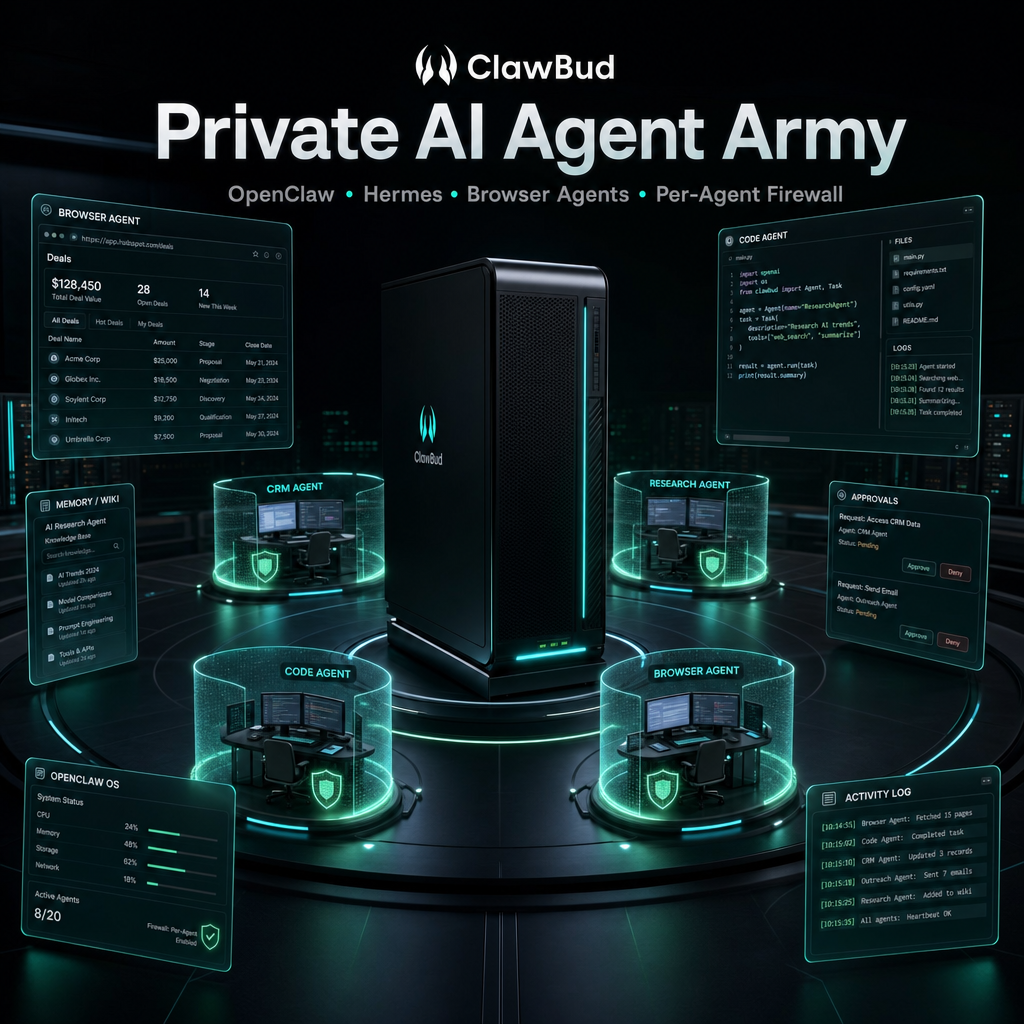
In ClawBud, this is the core idea: a fully managed Agentic OS running on a private cloud computer, with OpenClaw, Hermes, browser agents, code agents, integrations, memory, and per-agent boundaries ready in clicks.
The minimum architecture that works
A useful agent army needs more than a model and a prompt.
Here is the stack I would not skip:
| Layer | What it does | Why it matters |
|---|---|---|
| Private cloud computer | Gives the agent army a dedicated machine | Avoids shared container behavior and gives agents a real workspace |
| Agent runtime | Runs OpenClaw and other agents | Handles tools, sessions, skills, and execution |
| Browser layer | Gives agents a real Chromium browser | Needed for dashboards, SaaS tools, forms, and web workflows |
| File system | Stores documents, outputs, screenshots, reports, and artifacts | Agents need durable working material |
| Memory and wiki | Keeps long term context and operating knowledge | Prevents every task from starting from zero |
| Approval gates | Stops risky actions until a human approves | Protects money, customer data, production systems, and reputation |
| Per-agent boundaries | Limits what each agent can touch | A sales agent should not have the same permissions as a code agent |
| Logs and audit trail | Shows what happened, when, and why | Debugging becomes possible |
| Human control surface | Lets people watch, steer, and stop agents | Trust comes from visibility |
If one of these layers is missing, the system can still demo well. It just will not behave like a real business tool for long.
Start with jobs, not agents
The mistake most teams make is creating agents before defining jobs.
Do not start with “we need ten agents.” Start with the business jobs that should run every day.
Good agent jobs look like this:
- Monitor new support messages and draft replies.
- Read new leads, enrich them, and update the CRM.
- Check failed payments and prepare follow-up messages.
- Research a list of prospects and produce a short sales brief.
- Watch a product dashboard and report unusual changes.
- Prepare a weekly SEO report from Search Console and Analytics.
- Review a repository issue and suggest a code plan.
- Run browser tasks in a customer portal and save proof.
Each job should have:
- a clear trigger
- a clear owner
- allowed tools
- blocked tools
- expected output
- approval rules
- fallback behavior
- logging requirements
Once the jobs are clear, the agents almost design themselves.
A useful first agent army
For most businesses, I would start with five agents, not fifty.
1. The inbox agent
This agent watches customer messages from channels like email, Telegram, WhatsApp, Slack, Discord, or website forms.
Its job is not to answer everything blindly. Its job is to classify, draft, route, and handle low-risk replies.
Give it access to:
- customer support docs
- CRM read access
- message history
- approved reply templates
- escalation rules
Do not give it:
- billing changes
- refunds
- admin settings
- production system access
2. The research agent
This agent finds information and turns it into structured output.
It can research prospects, competitors, market changes, product updates, customer accounts, or technical docs.
Give it browser access, a notes folder, and a clear report format.
The important part is output discipline. A research agent that returns a wall of links is not useful. A good one returns decisions, sources, and next steps.
3. The CRM agent
This agent keeps the business database clean.
It can update lead status, summarize calls, create follow-up tasks, tag contacts, and detect stale opportunities.
This agent needs strict write boundaries. Let it update safe fields. Make it ask before deleting, merging, exporting, or mass-editing records.
4. The browser operations agent
This is the agent that uses real web apps.
It can log into dashboards, fill forms, pull reports, check order status, download invoices, upload files, or capture screenshots.
This agent needs a dedicated browser session. If the session resets constantly, the work becomes painful. If the browser is shared with other agents, debugging becomes worse.
In ClawBud, the Watch Agent button matters here because a human can watch and control the agent browser in real time. That is not a cosmetic feature. It is how trust gets built.
5. The code and workflow agent
This is where Hermes, Claude Code, Codex, and similar tools fit.
Hermes is useful when work needs state, tasks, tools, and execution flow. Claude Code and Codex are better for software changes, code review, debugging, and implementation.
Do not mix all code permissions into one general agent. Keep software agents separate from customer operations agents.
A code agent can be powerful, but it should have the tightest approval rules.
The permission model is the product
The most important question is not “which model is smartest?”
The real question is: what can this agent touch?
For every agent, define four zones:
| Zone | Meaning | Example |
|---|---|---|
| Read | The agent can inspect data | Read CRM records, docs, tickets |
| Draft | The agent can prepare an output | Draft an email, generate a report, suggest a code patch |
| Execute with approval | The agent can act only after human approval | Send an email, publish content, update a deal stage |
| Never | The agent cannot touch it | Delete data, change billing, access secrets, deploy to production |
This is where private infrastructure matters.
If every agent runs in the same shared environment with the same broad access, you do not have an agent army. You have one overpowered assistant wearing different hats.
A real system needs per-agent boundaries.
ClawBud is built around this idea with a dedicated UFW firewall per agent, private infrastructure per customer, and managed setup so a business does not have to become a DevOps team before using agents.
Browser state is not a small detail
Most business workflows happen inside browser-based software.
CRMs. Admin panels. Ecommerce dashboards. Analytics tools. Invoicing systems. Support inboxes. Vendor portals. Government websites. Bank portals. Internal tools.
If your agent cannot keep a stable browser session, it will fail on boring tasks.
Good browser infrastructure should support:
- persistent login state
- screenshots for proof
- file downloads
- file uploads
- human takeover
- session isolation
- clear logs of what the browser did
The browser should not be treated as a temporary side tool. For business agents, the browser is often the workplace.
Memory should be boring and useful
Agent memory gets overcomplicated fast.
You do not need mystical memory. You need reliable operating knowledge.
Useful memory includes:
- company facts
- product rules
- customer preferences
- approved tone and wording
- process checklists
- known errors
- recurring decisions
- account-specific instructions
- links to canonical docs
Bad memory is a pile of random chat transcripts with no structure.
A better setup is a small internal wiki that agents can read and update carefully. Raw notes can exist, but the maintained knowledge layer should be clean.
For example, a support agent should know the refund policy, the escalation flow, and the product limitations. A code agent should know repo structure, deployment rules, and which files are off limits.
Logging is what saves you later
Every agent system feels fine until something goes wrong.
Then you need answers:
- what did the agent do?
- what tool did it call?
- what data did it read?
- what output did it create?
- what approval did it ask for?
- who approved it?
- what changed after approval?
- where is the artifact?
Without logs, the only answer is “the agent did something.” That is not acceptable for a business.
A decent log does not have to be fancy. It needs to be readable, searchable, and tied to the task.
If an agent updates a CRM record, the log should say which record, which field, old value, new value, and why. If an agent downloads a report, the log should include the source and saved file. If an agent fails, the log should show the blocker.
The human control loop
Autonomy does not mean humans disappear.
It means humans stop doing repetitive work and start managing decisions.
A healthy agent army has three human control points:
- Before work starts: humans define the job, rules, and permissions.
- During work: humans can watch, steer, pause, or approve.
- After work: humans can review logs, outputs, and next actions.
The worst agent product is one that hides the work and asks for trust.
The better product shows the work and earns trust.
A practical rollout plan
Here is the rollout I would use for a real business.
Week 1: pick one workflow
Choose one workflow that is painful but not dangerous.
Good first workflows:
- support triage
- lead enrichment
- weekly reporting
- content research
- CRM cleanup
- browser-based report collection
Bad first workflows:
- payments
- refunds
- production deploys
- legal decisions
- medical decisions
- mass customer messaging
The first workflow should prove reliability, not bravery.
Week 2: define the agent contract
Write a one-page contract for the agent:
- role
- goal
- tools
- blocked tools
- input sources
- output format
- approval rules
- escalation rules
- logging rules
This document becomes more important than the prompt.
Week 3: run with human approval
Let the agent do the work, but require approval before external action.
For example:
- draft replies, but do not send
- prepare CRM updates, but ask before writing
- collect reports, but do not email customers
- suggest code changes, but do not merge
This phase reveals missing rules quickly.
Week 4: automate the safe parts
After the workflow is stable, remove approval only from low-risk steps.
Good candidates:
- tagging leads
- creating internal notes
- generating daily summaries
- saving reports
- updating non-sensitive task status
Keep approval for anything that affects money, customers, production, or reputation.
What to avoid
Avoid giving every agent every tool
That feels convenient at the start and becomes a security problem later.
Agents should get the tools they need, not the tools that exist.
Avoid “one mega agent”
A single agent that does support, sales, code, finance, and operations will become hard to understand and harder to control.
Separate roles are easier to debug.
Avoid invisible automation
If people cannot see what the agent is doing, they will not trust it.
Visibility is not optional.
Avoid treating prompts as infrastructure
Prompts matter, but prompts do not replace permissions, logs, browser state, memory, or recovery.
Avoid shared infrastructure for sensitive work
Shared systems can be fine for simple tools. For business agents touching real data, private infrastructure is cleaner and safer.
Where ClawBud fits
ClawBud is built for teams that want the private agent army setup without building the whole stack themselves.
The product gives each customer a private cloud computer for their agents, not shared containers. It is fully managed, so the customer does not need terminal knowledge or server maintenance.
Inside that environment, the customer can run OpenClaw agents, Hermes, code agents, browser agents, integrations, skills, memory, files, and workflows. Each agent can have its own boundaries, including dedicated firewall controls. Agents also get dedicated Chromium browser access, and humans can watch or control the agent browser directly from the dashboard.
That is the difference between “AI chat” and an Agentic OS.
Chat is where you talk to a model.
An Agentic OS is where a business runs work.
Checklist: before you run agent work in production
Use this checklist before trusting agents with real business tasks.
- [ ] Every agent has a written role.
- [ ] Every agent has allowed tools and blocked tools.
- [ ] Risky actions require approval.
- [ ] Browser sessions are persistent and isolated.
- [ ] Files and artifacts have a stable home.
- [ ] Logs show tool calls, outputs, approvals, and errors.
- [ ] Memory is structured, not just chat history.
- [ ] Humans can watch or steer important workflows.
- [ ] External messages are drafted before being sent automatically.
- [ ] Production systems are protected by stricter rules.
- [ ] Customer data is not mixed across shared environments.
- [ ] There is a rollback or repair path when an agent gets stuck.
If this list feels heavy, that is the point. Real business automation is not a toy.
Common questions
Is this just OpenClaw hosting?
No. OpenClaw hosting gives you a place to run OpenClaw. A private agent army needs more than hosting: browser state, files, memory, logs, approvals, integrations, permissions, human control, and recovery. ClawBud includes OpenClaw, but the product is the managed Agentic OS around it.
Can I do this myself on a VPS?
Yes, if you have the time and technical skill. A VPS gives flexibility, but you own setup, updates, security, browser issues, service failures, logs, and support. ClawBud is for teams that want the private machine model without managing the machine themselves.
Why not use a normal SaaS agent platform?
Normal SaaS platforms are easier to start with, but they often hide the infrastructure and limit control. For sensitive business workflows, a private dedicated environment gives better isolation, clearer ownership, and more room for real browser and file-based work.
How many agents should a business start with?
Start with one or two workflows, not a giant agent army. Once the permissions, logs, approvals, and outputs are stable, add more agents. Five useful agents beat fifty vague ones.
Which agents belong together?
Agents that share business context can live in the same private environment, but they should not all share the same permissions. Support, CRM, browser operations, research, and code agents need different boundaries.
What is the biggest risk?
The biggest risk is giving agents too much power before the control loop is ready. The second biggest risk is having no logs when something breaks.
Bottom line
A private AI agent army is not a pile of chatbots.
It is a business operating environment for autonomous work. The model matters, but the surrounding system matters more: private infrastructure, agent roles, browser state, memory, approvals, logs, and per-agent boundaries.
If you get that foundation right, agents become useful workers.
If you skip it, they become impressive demos that nobody trusts in production.
ClawBud exists for the teams that want the first version: a managed Agentic OS for a private AI agent army, running on a dedicated cloud computer, with OpenClaw, Hermes, browser agents, code agents, integrations, and real operational boundaries ready in clicks.
Try ClawBud at clawbud.ai.