ClawBud Pricing Explained: BYOK, Starter, Pro, and Business
SEO Title: ClawBud Pricing Explained: BYOK, Starter, Pro, and Business
Most agent pricing pages hide the real question.
They show a monthly number, maybe a model list, maybe a polite feature grid. But what you actually need to know is simpler: what do you get when the agent stops being a demo and starts doing real work?
ClawBud is built around a blunt answer. Not a chatbot. Not a shared container. A full computer, a real army of agents, and a per-agent firewall, all yours, deployed in one click.
This guide breaks down the four ClawBud plans: BYOK, Starter, Pro, and Business. No fluff. Just what each plan is for, who should choose it, and how it compares to code agents and CLIs.
The quick version
Current plans:
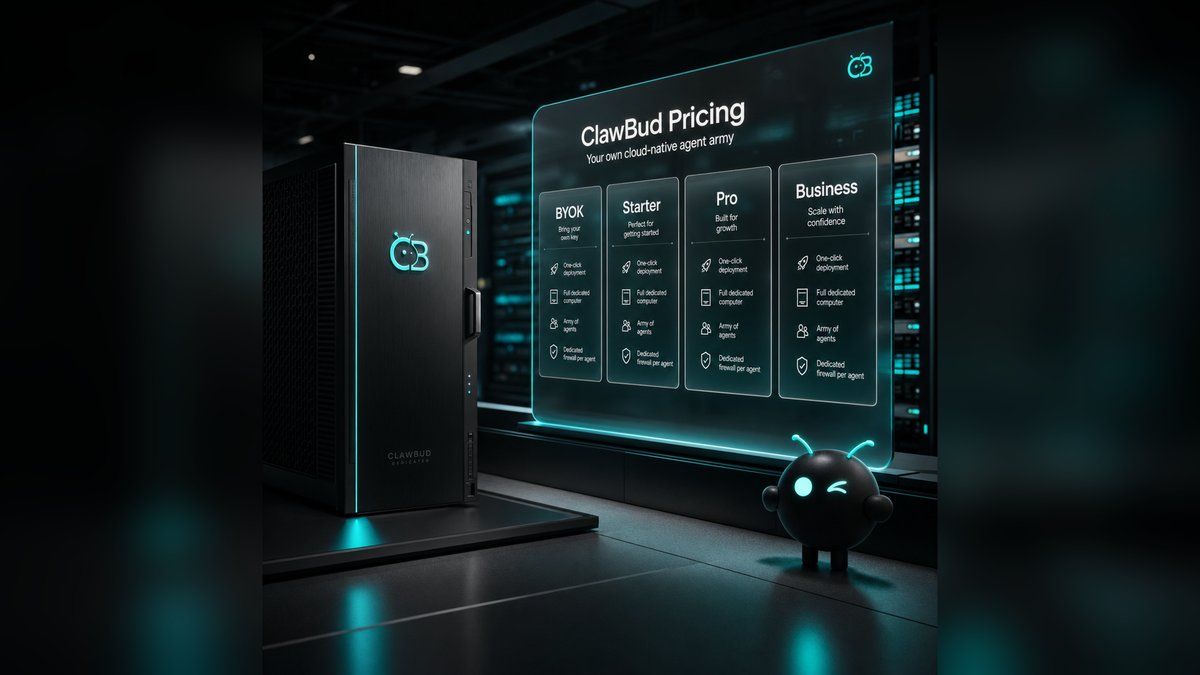
- BYOK: $20 per month, unlimited usage with your own model keys, 8 GB RAM, 4 cores, 150 GB SSD.
- Starter: $39 per month, 10,000 monthly credits, 8 GB RAM, 4 cores, 150 GB SSD.
- Pro: $79 per month, 25,000 monthly credits, 12 GB RAM, 6 cores, 200 GB SSD.
- Business: $169 per month, 60,000 monthly credits, 24 GB RAM, 8 cores, 400 GB SSD.
All four plans are built around the same product idea: your own cloud-native agent army. The difference is how much compute, model access, support depth, and operational headroom you need.
BYOK: the lean plan for people who bring their own keys
BYOK costs $20 per month and is the cleanest option if you already pay for model access elsewhere.
You bring your own API keys. ClawBud provides the managed OpenClaw environment, your dedicated computer, Telegram access, one-click setup, and the surrounding product layer. Your messages are not metered by ClawBud credits because the model cost runs through your own provider account.
This is a strong fit for technical founders, builders, and teams who already know which model stack they want. It is also useful if you care about controlling the model bill directly while still avoiding the work of setting up OpenClaw yourself.
Starter: the simple managed OpenClaw plan
Starter costs $39 per month and includes the dedicated computer, the OpenClaw agent, and AI usage in one package.
You get 10,000 monthly credits, Telegram access, and a budget model tier designed for normal business work. This is the plan for someone who wants to try ClawBud without becoming their own infrastructure person.
Starter is not a toy plan. It still gives you the core ClawBud architecture: a full computer for your OpenClaw agent, one-click setup, and a dedicated firewall around the agent environment.
That matters because a real autonomous agent needs more than a prompt box. It needs a place to run, remember, browse, execute tasks, and connect to tools. A chatbot answers. An autonomous OpenClaw agent works inside an operating environment.
Pro: where the agent army starts feeling real
Pro costs $79 per month and is the plan I would recommend for most serious users.
You get more compute, 25,000 monthly credits, more model access, Telegram plus WhatsApp and Discord, the full skill catalog, and access to Pro-level agent surfaces like NemoClaw, Goose, and DeerFlow 2.0 where available.
This is where the difference between code agents and autonomous agents becomes practical.
A code agent or CLI, like Codex, Claude Code, Gemini CLI, or OpenCode, is excellent when the job is software work. It can inspect files, write code, run commands, and help a developer move faster.
An autonomous OpenClaw agent is broader. It can sit across channels, use browser sessions, work from memory, connect to business tools, route tasks, and operate more like a digital teammate than a coding assistant.
ClawBud supports both categories. You can install code agents and CLIs in one click, but the platform is not only a code terminal in the cloud. It is your own cloud-native agent army, with OpenClaw as the base runtime and a per-agent firewall giving each agent real boundaries.
Business: more room for heavier operations
Business costs $169 per month and is built for teams that need more room.
You get a larger dedicated computer with 24 GB RAM, 8 cores, and 400 GB SSD, plus 60,000 monthly credits, all channels, all skills, custom integrations, and priority support.
This is the plan for heavier automation, larger knowledge bases, more active workflows, and teams that want ClawBud to become part of daily operations rather than an experiment.
A shared environment may be fine for a demo. It is not where I would put a serious agent army. A dedicated computer and a dedicated firewall are not decorative features. They are the difference between playing with agents and trusting them with real work.
Why ClawBud pricing is not chatbot pricing
Chatbot pricing usually measures conversations.
ClawBud pricing covers an operating layer.
That includes a managed OpenClaw runtime, a dedicated computer, one-click agent setup, browser capability, channels, skills, support, and a dedicated firewall. The value is not just the answer you get back from a model. The value is the work the system can safely attempt after the answer.
For a broader product overview, start with clawbud.ai. If you want the plan table directly, go to ClawBud pricing. If you want to see how the product has been moving, check the ClawBud blog.
Which plan should you choose?
Choose BYOK if you already manage model keys and want the lowest platform price.
Choose Starter if you want the simplest way to launch a managed OpenClaw agent without thinking about model billing.
Choose Pro if you want ClawBud to become a real operating layer across channels, skills, and stronger agent workflows.
Choose Business if the agent is going to support higher-volume work, team operations, priority support needs, or deeper integrations.
My honest take: most businesses should start with Pro if they can. Starter is good for testing. BYOK is great for builders. Business is for teams that already know the agent will matter. Pro is the sweet spot where ClawBud stops feeling like a tool and starts feeling like a small agent department.
FAQs
Is ClawBud only for developers?
No. ClawBud is built so non-technical users can launch a managed OpenClaw agent with one-click setup. Developers can still use code agents and CLIs inside the environment, but the product is not limited to coding work.
What is the difference between BYOK and Starter?
BYOK means you bring your own model API keys and handle model billing yourself. Starter includes ClawBud-managed AI usage with 10,000 monthly credits, so it is simpler for users who do not want to manage provider keys.
Does every plan include a dedicated firewall?
Yes. The dedicated firewall is part of the ClawBud architecture. It gives each OpenClaw agent real network boundaries instead of treating security as an afterthought.
Why does ClawBud talk about a full computer?
Because an autonomous OpenClaw agent needs somewhere real to run. A full computer gives the agent room for tools, browser work, memory, files, integrations, and long-running tasks.
Which ClawBud plan is best for a small business?
Starter is enough for testing, but Pro is the better long-term choice for most small businesses. It adds more credits, more channels, more skills, and more room for actual autonomous work.
Can I use code agents like Codex or Claude Code with ClawBud?
Yes. ClawBud supports one-click installs for code agents and CLIs, while also giving you autonomous OpenClaw agents for broader operational work. That distinction matters: code agents help build software, autonomous agents help run work.
Start with ClawBud
If you want a chatbot, there are cheaper tabs on the internet.
If you want your own cloud-native agent army, start with ClawBud: a full computer, a real army of OpenClaw agents, a dedicated firewall, and one-click setup.
Start here: https://clawbud.ai